
Menu
.png)
AI systems rely on speed to deliver results in real-time. GPUs (Graphics Processing Units) significantly reduce AI latency by handling thousands of computations simultaneously, unlike CPUs, which process tasks sequentially. This makes GPUs ideal for time-sensitive AI applications like autonomous vehicles, chatbots, and video analytics. Key benefits include:
GPUs have a clear edge over CPUs when it comes to AI inference, thanks to their architecture and ability to significantly reduce latency. While CPUs are built with a few powerful cores designed for sequential tasks, GPUs come equipped with thousands of smaller cores optimized for parallel processing. This design difference makes GPUs the go-to option for AI inference, where tasks often involve performing the same operations on vast datasets.
AI models rely heavily on repetitive matrix and vector calculations. CPUs handle these tasks sequentially, processing one step at a time. In contrast, GPUs excel by running these operations simultaneously across their thousands of cores. This parallelism translates to major reductions in latency, with GPUs often delivering performance boosts of 5–20× for tasks that can be parallelized.
Modern NVIDIA GPUs take things a step further with Tensor Cores, specialized hardware designed to speed up the matrix multiplications central to deep learning. Tensor Cores are optimized for mixed-precision calculations, such as FP16 or INT8, which are commonly used in neural networks like transformers and convolutional neural networks.
For instance, the NVIDIA A100 GPU's Tensor Cores can achieve up to 312 TFLOPS for FP16 operations, compared to 19.5 TFLOPS using standard FP32 CUDA cores. This results in 2–5× faster performance for models like BERT and ResNet when combined with TensorRT.
GPUs bring more than just raw power - they also excel at reducing latency through high memory bandwidth, efficient data movement, and their massive parallel computing capabilities. These factors enable GPUs to process tasks 10–100× faster than CPUs.
This speed advantage has real-world implications. For example, security surveillance systems use GPUs to analyze video feeds in under 100 milliseconds, allowing for immediate threat detection without the delays of cloud processing. In natural language processing, GPUs enable chatbots and translation models to generate responses in milliseconds, while recommendation systems analyze user data on the fly to deliver personalized suggestions almost instantly.
Benchmarks highlight this performance gap: GPUs like the NVIDIA A100 reduce inference latency by 5–20× compared to high-end CPUs for image classification tasks. Tensor Cores further enhance throughput, achieving over 10,000 inferences per second. The NVIDIA H100 GPU pushes the envelope even further, with memory bandwidth reaching 2 TB/s. This high-bandwidth memory ensures data stays readily accessible, avoiding the delays common with CPU-based DRAM setups. Together, these features make GPUs indispensable for real-time AI applications where response times under 50 milliseconds are critical.
With these capabilities, GPUs set the stage for advanced optimization techniques, which will be explored in the next sections.
GPUs, with their unparalleled parallel processing power and Tensor Core features, can be fine-tuned to deliver even better performance. By applying specific optimization techniques, you can achieve a 2–5× boost in GPU efficiency and bring latency down to under 100ms - a critical benchmark for real-time applications. Here’s how to unlock the full potential of GPUs for faster AI inference.
NVIDIA TensorRT is a powerful tool for transforming trained models into highly efficient inference engines. It refines computation graphs and applies optimizations that standard frameworks often miss. Start by exporting your model from frameworks like PyTorch or TensorFlow to ONNX format. Then, use TensorRT's builder to fuse layers and optimize execution for your GPU.
One key feature is precision calibration, which converts FP32 computations to FP16 or INT8. This not only makes use of Tensor Cores but also reduces memory bandwidth demands. For U.S.-based deployments - like customer-facing chatbots or fraud detection systems - these optimizations can significantly cut both latency and cloud GPU expenses.
Kernel fusion is a technique that combines sequential operations into a single GPU kernel. This keeps intermediate results in the GPU's fast on-chip memory, reducing the overhead caused by frequent memory transfers. While TensorRT automatically applies this optimization, certain high-demand production systems - such as Transformer attention blocks - might benefit from manually fine-tuned fused kernels.
Memory optimization focuses on ensuring that GPU threads access data in aligned, contiguous patterns, which maximizes bandwidth utilization. This involves selecting the right tensor layout (e.g., NCHW), ensuring tensors remain contiguous before key operations, and minimizing host-to-device data transfers. For latency-sensitive tasks like document intelligence APIs or video analytics, these strategies can save crucial milliseconds and improve cost efficiency in cloud-based environments.
When a single GPU isn’t enough, scaling across multiple GPUs becomes essential. Data parallelism, for example, replicates models across GPUs to handle multiple requests simultaneously. On the other hand, model and pipeline parallelism distribute workloads to balance memory and computational demands.
For applications where low latency is critical, data parallelism with autoscaling is often the best choice, as it minimizes communication overhead between GPUs. In cases involving very large language models, a carefully tuned combination of pipeline or tensor parallelism, high-bandwidth interconnects like NVLink, and smart request routing within a single availability zone can help maintain low latency while scaling up capacity.
Once you’ve optimized your model, the next step is integrating GPUs into your production workflow. This involves selecting the right hardware, fine-tuning software configurations, and using tools to minimize response delays. Start by identifying bottlenecks like model size, batch size, pre-processing overhead, and network I/O. From there, focus on choosing the right hardware, preparing your software stack, and conducting load tests under realistic traffic conditions.
The hardware you choose plays a critical role in meeting your performance goals. For large transformer models or vision models requiring sub-100 ms response times, data center GPUs like NVIDIA’s A100 or H100 are excellent options. These GPUs offer high Tensor Core throughput and memory bandwidth, which help reduce compute and memory-paging delays.
For Edge AI workloads, such as real-time video analytics or predictive maintenance, power-efficient GPUs with Tensor Core support are ideal. These GPUs handle low-latency inference directly at the edge, eliminating the need for cloud processing. When dealing with latency-sensitive tasks and small batch sizes (1–8), prioritize GPUs with higher memory bandwidth. This ensures faster tensor operations and better single-stream performance, which are critical for online inference scenarios.
To maximize GPU performance, use FP16 (or bfloat16) precision to take advantage of Tensor Cores. This setup delivers significant speedups without sacrificing accuracy. For even greater performance gains, consider INT8 quantization, which can achieve 2–4× improvements over FP32. INT8 works well for tasks like classification, detection, and language processing, but it’s essential to calibrate it using representative datasets. In regulated industries like healthcare and finance, start with FP16 and adopt INT8 only after thorough validation.
Asynchronous execution is another key technique for reducing latency. By overlapping data transfers with computations, you can minimize I/O delays. For instance, non-blocking data transfers (e.g., cudaMemcpyAsync) allow data to move between the host and device without stalling operations. Additionally, using multiple CUDA streams lets you handle pre-processing, inference, and post-processing simultaneously. Configuring your inference framework to use multiple streams per GPU ensures that computation, data loading, and result transfers happen concurrently. This is particularly effective in high-traffic environments where multiple requests are processed at once, improving both average and peak latency.
After setting up your hardware and precision configurations, specialized software tools can further optimize your workflow. Beyond TensorRT, tools like NVIDIA Run:ai Model Streamer address cold-start delays - a common challenge in production environments. Model Streamer minimizes these delays by enabling concurrent weight loading and direct GPU memory streaming. This keeps models “warm” in memory, allowing requests to be routed to pre-initialized GPU contexts.
For example, benchmarks on AWS g5.12xlarge instances (A10G GPUs) show that Model Streamer loaded models in 28.28 seconds using IO2 SSD (compared to 62.69 seconds with HF Safetensors) and 23.18 seconds from S3 (compared to 65.18 seconds with Tensorizer). These improvements significantly reduce the time it takes to generate the first token or frame, which is critical for production services.
If your project is U.S.-based and lacks in-house expertise in GPU optimization, companies like Artech Digital offer comprehensive AI integration services. They specialize in building AI-powered web apps, custom AI agents, advanced chatbots, and computer vision solutions. They also fine-tune large language models, ensuring your hardware, software, and infrastructure are optimized to meet strict latency and cost requirements.
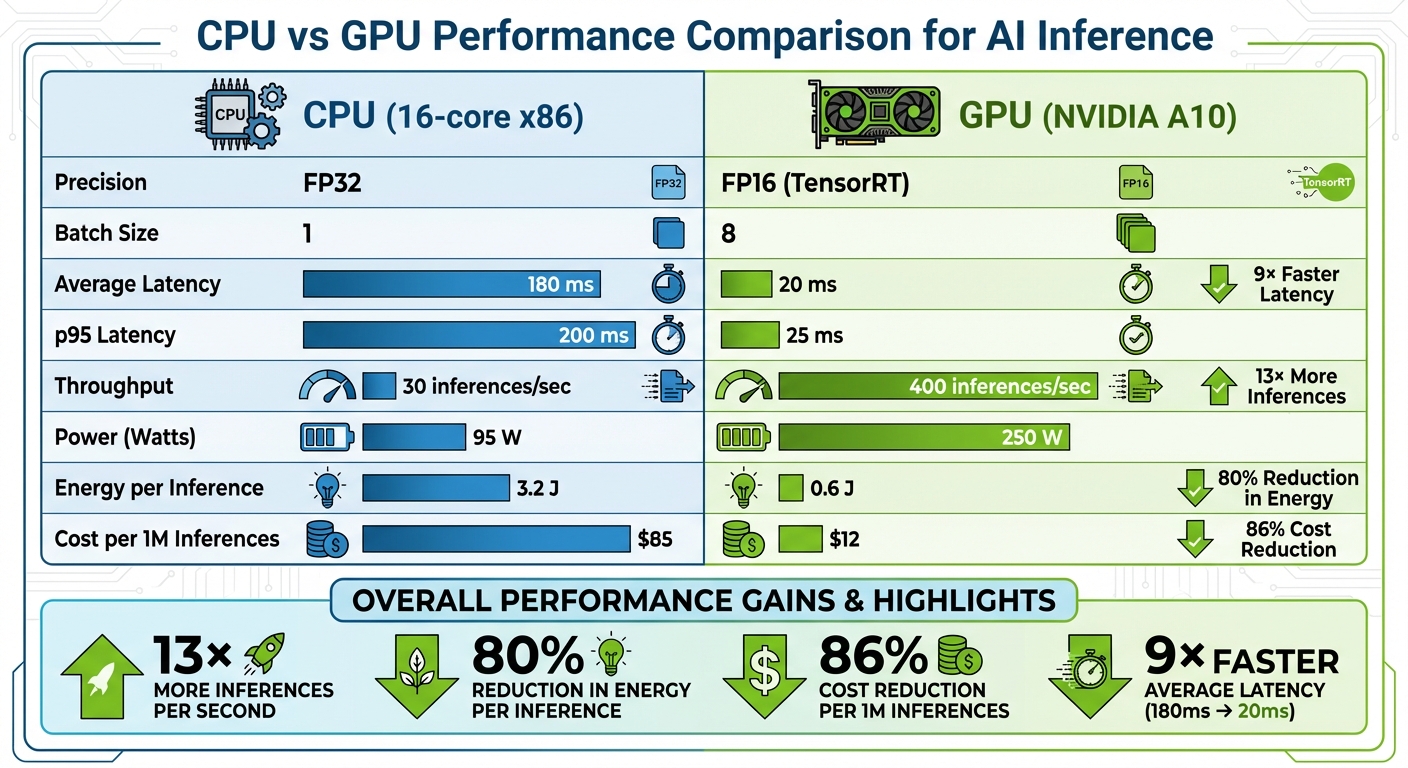
CPU vs GPU Performance Comparison for AI Inference
Quantifying the performance boost after implementing GPU acceleration is crucial. To do this, focus on key metrics like end-to-end latency, throughput, and cost per inference. End-to-end latency measures the time from when a request is received to when a response is delivered. This is often reported using percentiles like p50, p90, p95, and p99, expressed in milliseconds, to capture both average and edge-case performance. Throughput, on the other hand, tells you how many inferences your system can handle per second while staying within a specific latency budget, such as "1,000 inferences/second at p95 < 50 ms."
For accurate comparisons, ensure consistency in your testing setup. Use the same model, dataset, and preprocessing pipeline for both CPU and GPU tests. Clearly document your hardware (e.g., "16-core x86 CPU vs. NVIDIA A10 GPU") and match batch sizes to your workload - batch size 1 for real-time tasks and moderate batch sizes (8–64) for high-throughput needs. Run tests long enough to avoid cold-start effects, and leverage tools like NVIDIA Nsight Systems, PyTorch Profiler, or TensorFlow Profiler to gather detailed timing data. To calculate cost per 1,000 inferences ($), divide your hourly infrastructure cost by the number of inferences completed per hour at your target SLA.
GPU acceleration can deliver 5–20× faster inference speeds compared to CPU-only configurations, especially for deep learning tasks like computer vision and NLP. For instance, a convolutional neural network that takes 200 ms per image on a 16-core CPU can often be reduced to 10–40 ms on a mid-range GPU with TensorRT optimizations and mixed precision. Similarly, a transformer-based NLP model processing 20 inferences/second on a CPU might achieve 200–400 inferences/second on a single GPU with comparable latency targets, especially when using FP16 precision and kernel fusion.
To monitor these gains, track both average and tail latencies (e.g., p95 or p99) using in-code timers. Break down the times for preprocessing, inference, and post-processing to get a detailed view. For real-time applications like chatbots, measure metrics such as time-to-first-token and time-to-complete-response - common targets include under 500 ms to deliver a smooth user experience. Store these results in a time-series database and visualize them on dashboards to monitor progress and detect potential regressions across different hardware setups or software versions.
These metrics provide a solid foundation for comparing CPU and GPU performance.
A well-structured comparison table can help teams make informed decisions about hardware investments. Here's an example comparing CPU and GPU performance for an image classification task:
| Metric | CPU (16-core x86) | GPU (NVIDIA A10) |
|---|---|---|
| Precision | FP32 | FP16 (TensorRT) |
| Batch Size | 1 | 8 |
| Average Latency | 180 ms | 20 ms |
| p95 Latency | 200 ms | 25 ms |
| Throughput | 30 inferences/sec | 400 inferences/sec |
| Power (Watts) | 95 W | 250 W |
| Energy per Inference | 3.2 J | 0.6 J |
| Cost per 1M Inferences | $85 | $12 |
While GPUs may consume more power, they deliver far better efficiency in terms of performance-per-watt and performance-per-dollar. In this example, the GPU processes over 13× more inferences per second, reduces energy per inference by more than 80%, and slashes costs by 86%. These advantages grow even further when employing advanced batching techniques or running multiple GPUs.
The real-world benefits of GPU acceleration become clear in various applications:
These examples highlight how GPU acceleration can transform performance across industries, making AI applications faster and more efficient.
GPU acceleration has become a game-changer for reducing AI latency in production environments. By taking advantage of parallel processing, Tensor Cores, and software tools like TensorRT, businesses can achieve 5–20× faster inference speeds compared to CPU-only setups. This means AI systems can shift from taking seconds to respond to delivering results in just milliseconds - critical for real-time applications.
Beyond speed, optimized GPU pipelines can help cut infrastructure costs by 30–40%, delivering better ROI by shortening the time it takes to generate actionable insights. Whether you're building AI chatbots that need lightning-fast replies, deploying computer vision for manufacturing quality checks, or using medical imaging tools that analyze scans in seconds, GPU acceleration ensures your systems operate efficiently and scale effectively with demand.
For U.S.-based real-time AI applications, deploying GPU compute at the edge brings additional benefits like reduced network latency and improved data privacy. Pairing the right GPU hardware with proven techniques - such as kernel fusion, mixed precision, and asynchronous execution - ensures your AI systems remain responsive, even as workloads grow more demanding.
Collaborating with experts like Artech Digital, who specialize in hardware selection and inference optimization, can further enhance your ability to deliver scalable, high-performance AI solutions. These investments aren’t just about keeping up - they’re about staying ahead, as GPU acceleration becomes a critical element for businesses striving to meet the rising expectations of modern AI applications.
To make the most of these advancements, measure key metrics like end-to-end latency, throughput, and cost-per-inference. These benchmarks provide a clear picture of the performance improvements and help guide ongoing optimizations. As AI workloads become more complex and users demand instant results, GPU acceleration has evolved from an optional upgrade to a must-have for businesses serious about deploying production-ready AI.
GPUs outperform CPUs in AI tasks because they excel at massive parallel processing, allowing them to perform thousands of calculations at the same time. This capability is crucial for managing the intricate mathematical operations that AI models rely on.
What sets GPUs apart is their optimization for operations like matrix multiplication and data manipulation - core components of machine learning and deep learning. By efficiently handling large datasets and executing multiple computations simultaneously, GPUs drastically cut down processing time and boost the speed of AI inference.
Tensor Cores are specialized hardware units built to speed up matrix operations, a cornerstone of AI computations. By efficiently managing these processes, they allow AI models to run faster, cutting down on latency during both training and inference.
This boost in processing power is particularly critical for deep learning tasks, where massive datasets need to be handled at high speeds. Tensor Cores play a pivotal role in ensuring smoother and quicker AI performance, which is crucial for reducing delays in real-time applications.
To improve GPU performance and cut down on AI latency, businesses can adopt several key strategies. One approach is leveraging GPU-accelerated libraries, which are designed to handle complex computations more efficiently. Another is optimizing the flow of data between the CPU and GPU, ensuring minimal bottlenecks. Fine-tuning AI models for parallel processing also plays a big role in distributing tasks effectively, which helps reduce processing delays.
On top of that, deploying scalable GPU clusters can make a noticeable difference, especially for real-time AI applications. Coupled with smart memory management, these adjustments allow businesses to achieve faster response times and get the most out of their hardware. This means delivering AI-powered solutions that are not only quicker but also more dependable.
.png)

.png)
